

We interrupt our regularly scheduled food blog format with this informational Facebook news.
You might be asking, “Hey, where’s the recipe?” Well, I had a problem and then I figured out a solution and I thought you might like to know about it too.
Whether you post photos of food on Facebook, pictures of your spastic dog, last night’s killer concert or your latest cross-country expedition, you may have come across this problem and perhaps this tutorial will provide the solution.
Do you ever look at an image on your new and vastly improved (*insert the-jury’s-still-out-look here*) Facebook timeline and think to yourself, “Wow Self, THAT is not how that image looked on my blog/mind/camera/computer! Why is it off-kilter?” Well I did.
And then I figured out how to reposition images posted into your timeline that are cropped to just the right size. Here’s how:
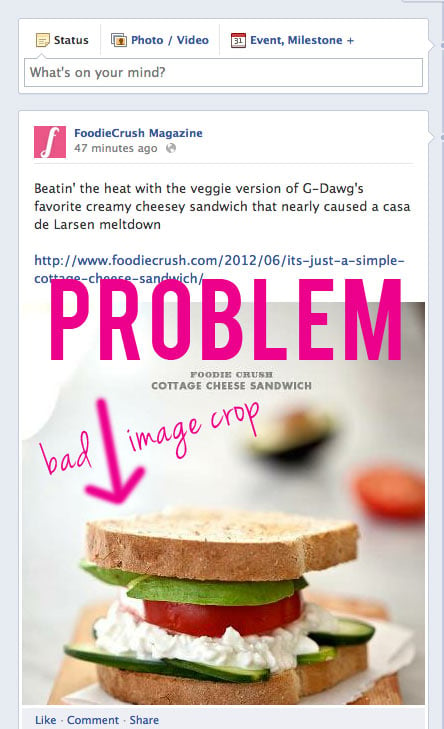
After posting your lovely and so carefully crafted image, you noticed its draggin at the bottom. A poorly cropped image won’t show off the best attributes of your photo: the subject. This baby needs to pull a Jeffersons and move on up.
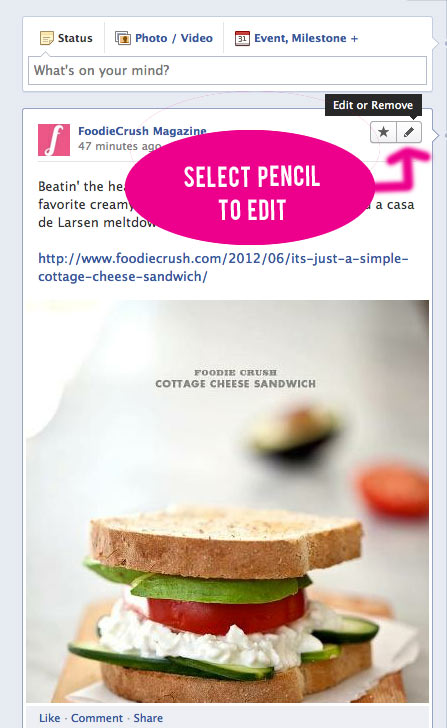
Step 1: Move your cursor to the pencil icon in the upper right corner of your Facebook post and select EDIT.
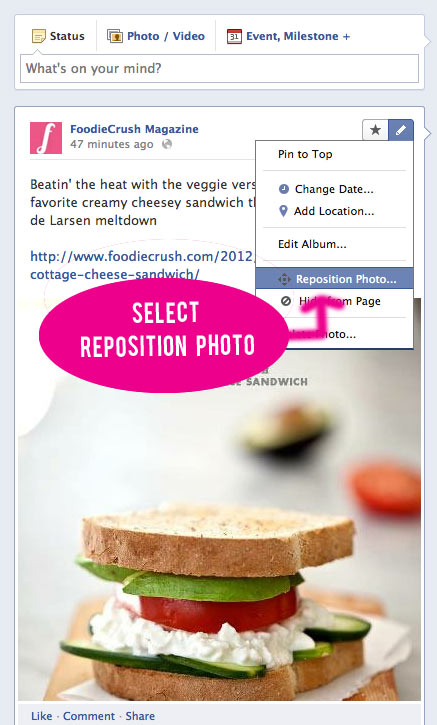
Step 2: In the drop down menu select REPOSITION PHOTO
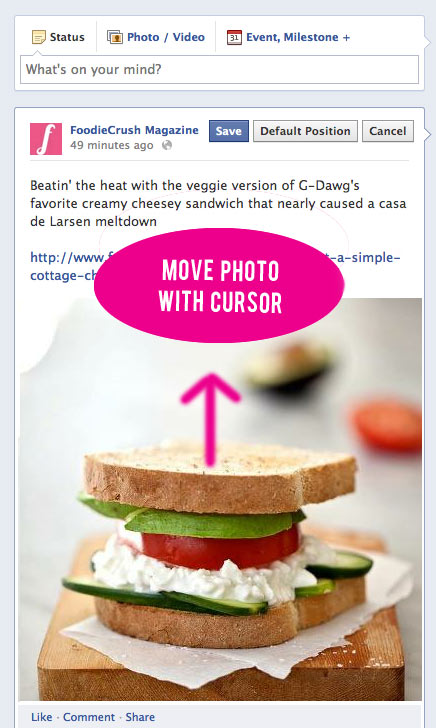
Step 3: Move cursor over image, select and DRAG IMAGE IN THE POSTION you wish for the optimum crop. This selection can be a little touchy so go slow and make sure your images is selected.
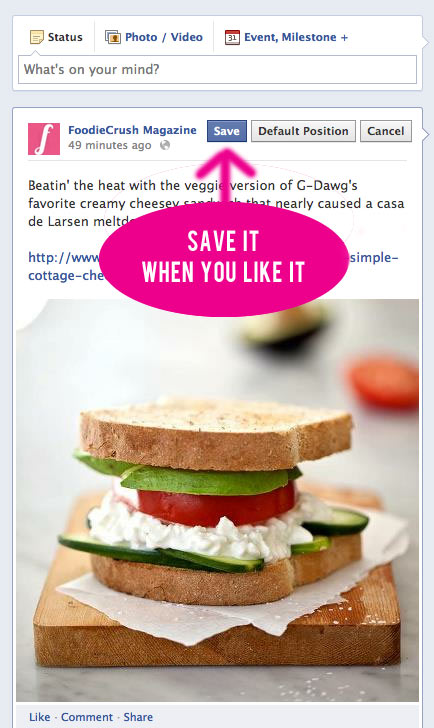
Final Step: Hit the SAVE button and you’re done.
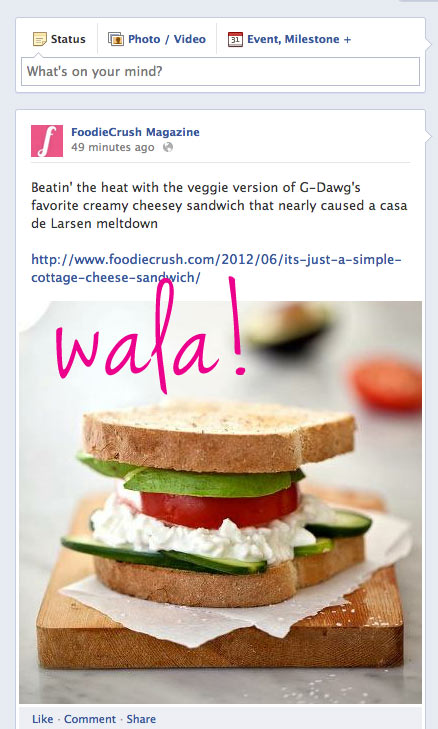
Do you like tips like this on the blog? If so, let me know. And if you don’t, please let me know that even more and we can resume our regular scheduled food programming.
Happy Tuesday everyone! I’ll be back with a recipe and Foodie Crush mag update next post.
Thanks for reading and please keep in touch. Subscribe to Foodie Crush and follow me on Twitter, Facebook and Pinterest and check out Foodie Crush magazine and Cookie Cravings cookbook.








stephe
I do that and it won’t SAVE. I’ve been trying for month. I can reposition and save but it doesn’t stick. Next time I go onto facebook it’s right back in the wrong spot. :( Any ideas?
Hi Stephe, are you saving the process after you make the change? And have you updated to the most recent version of Facebook timeline? Give it a try in a different browser like Firefox and see if that helps, it may be a cacheing issue. Good luck!
Jen
I had NO idea you could do that! Sweet!
Cassie
Great tip, Heidi!!
Sue T.
This is great! Thanks for the information!
patti
What a great tip, you made it look so simple even a computer challenged person like me can understand.
Anna Davidoff
Totally worth the interruption. That annoyed me so much when it happened but I thought there wasn’t anything I could and I was left helpless! lol. Thank you for the tip!
Thanks for letting me know you liked the post and I’m so glad it helped. Nothing I hate worse than a poorly cropped photo. Unless its poorly kerned type. Looks like I’ll pepper a few tips into the blog here and there, people seem to like it so far.
Ali @ Gimme Some Oven
Ahhh – THANK YOU for posting this! The photo cropping was driving me nuts. Excited to go back and start repositioning! :)
Cookie and Kate
My timeline just got so much prettier. Thank you, Heidi!
Julie @ Table for Two
uh what?! you rock. thank you!!!
Bev @ Bev Cooks
Never mind! Figured it out!
Bev @ Bev Cooks
GREAT tip. I do wonder though, do you have to publish the shot FIRST, then edit and republish?
Hi Bev! You do the editing of the photo after you publish the post. Glad you figured it out!
JennieLynn
I’ve been wondering about that. Thanks for the tip!
Maggie
Thanks so much for sharing this tip!
Kath
Very helpful! Thank you!
Amber K
Voila! It’s fixed :) That’s awesome.
Jennifer
Great pointer!
Christie {Pepper Lynn}
Thanks for the tip, Heidi!
Heidi @ Food Doodles
Thank you!!! I love this. I was trying to figure out how to crop my pictures so they’d look good on Facebook. This solves everything! <3
Theresa
Thank you so much for the tip! Definitely a good thing to know.
Laura (Tutti Dolci)
Ooh, thank you so much for posting this!!
Betty Ann @Mango_Queen
Thanks so much! This is absolutely sooo helpful. Heading over to my FB page now to “reposition” accordingly. Have a fabulous time on your own FB pages!
Carrie
YOU ARE AWESOME! Thank you!!!
Holly W
What great information! I never thought something like that was possible on FB,
Thanks Heidi!
Mark D.French
Thank’s for the input, most likely will put it in focus if I post an image.
Katie
hot dang! I’m so glad to know this.